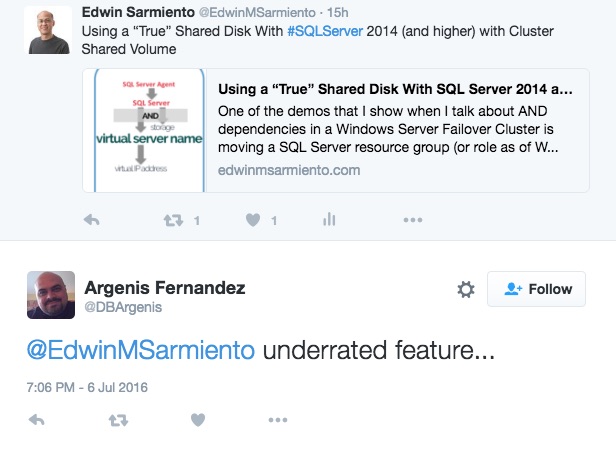
In a previous blog post, I talked about the benefits of using cluster shared volumes (CSVs) for your SQL Server 2014 and higher failover clustered instances (FCIs). It’s also interesting how SQL Server Microsoft Certified Master and Microsoft MVP Argenis Fernandez (blog | Twitter) responded to a Twitter post I shared about the blog post (additional comments from SQL Server experts came after.)
Now, considering that support for CSVs was only introduced in SQL Server 2014, it is still relatively new. And with older versions of SQL Server FCIs using the traditional shared disk, I bet that the upgraded versions will still use the traditional storage. Now, there’s nothing wrong with sticking with old practices so long as they meet the overall objectives. But there’s a reason why CSVs were introduced in SQL Server 2014: improved scalability, availability and manageability.
How It Was Before: SQL Server FCIs using Traditional Shared Disk
The way traditional shared disk works with SQL Server FCIs is that, while all of the WSFC nodes have a direct physical path to the underlying shared storage, only the node that currently owns the SQL Server clustered resource has the logical path to the disk. This means only the node that owns the SQL Server clustered resource can send I/O commands to the disk – reading/writing to files, opening/closing files, changing file sizes and all SQL Server-related commands. The other nodes in the WSFC are just waiting for the owner node to be unavailable so they can take over the workload. This also means that the SQL Server clustered resource is directly dependent on the shared disk as shown in the Dependency Report below.
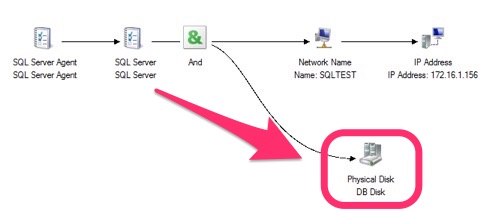
Because of the direct dependency, the amount of time it takes for SQL Server to come online is dependent on how quickly the WSFC can bring the shared disk online on one of the standby nodes. In some cases, if the device drivers for the storage are not consistent between the nodes of the WSFC, you cannot even bring the shared disk online, causing even more downtime on the SQL Server clustered resource. I still remember how I struggled to painstakingly bring a SQL Server 2005 FCI online after a failover not knowing that the Emulex HBA drivers were not consistent on all of the WSFC nodes.
Cluster Shared Volumes (CSVs) with SQL Server FCIs
CSVs still use the concept of a shared disk but with an added layer of abstraction. Instead of having the shared disk be accessible to only one WSFC node at a time, all of the WSFC nodes have their own logical paths to it. This is made possible thru the Server Message Block (SMB) protocol. Since the WSFC nodes are connected to each other thru the heartbeat network (it’s another reason to have a dedicated network for inter-node communication,) CSV can take advantage of this route to the shared storage to send I/O commands.
Don’t be confused. While all of the WSFC nodes have both physical and logical paths to the shared disk, only the node that owns the SQL Server clustered resource can own it, just like when using traditional shared disks. In other words, the owner node dictates how to send the I/O commands – either directly thru its own access path or thru the heartbeat network. This is why you won’t see any direct dependency on the shared disk if you look at the Dependency Report. It also means that the failover process will be faster with CSVs.
 (see, no shared disk)
But don’t be deceived. While the Dependency Report does not show a direct dependency on the shared storage, your databases are still on that storage. Just like when the drive containing your SQL Server databases crashes, your SQL Server instance availability is still dependent on that CSV disk. So, be sure to monitor those CSV disks just like how you would with any disks.
Try It Out
Whether you’re deploying new SQL Server FCIs or upgrading to SQL Server 2014 and higher versions, consider using CSVs. You’ll be happy that the Clustering team at Microsoft developed this feature and that the SQL Server team eventually supported it.

edwin, any idea on this?:
We created a 2 node cluster (sql) with the use of CSV (FC attached).
We did some speed tests with diskspd (the new sqlio) and noticed that the access to the CSV was very slow compared to storage in the clusted that isnt converted to CSV, and yes the tests were done on the coordination node (owner node), where it should have direct I/O to the storage.
Does this Microsoft KB article apply to your case?
https://support.microsoft.com/en-us/kb/2935810
Edwin,
The problem is not the failover but the speed of reads and writes to the CSV.
before the disk is converted to csv, it’s very fast, bu after conversion to CSV write and read speed is degraded…